

One of the perks of signing up for a Sam’s Club membership is that you get a complimentary household membership that another person can use to shop at Sam’s Club online or in the warehouse without the primary cardholder having to be there.
Sam’s Club intends for the secondary membership to be used by someone in the household or a family member. However, it is rarely enforced.
Here is how you can add a complimentary membership and obtain the secondary cardholder’s membership number, allowing them to register for their own Sam’s Club account and access their digital membership card.
Table of Contents
How to Add a Complimentary Membership
Giving someone a complimentary membership is very easy. There are three ways to do it:
Add a Second Cardholder During Initial Sign-up
The first place you can add a household member is during the sign-up process as a new member.
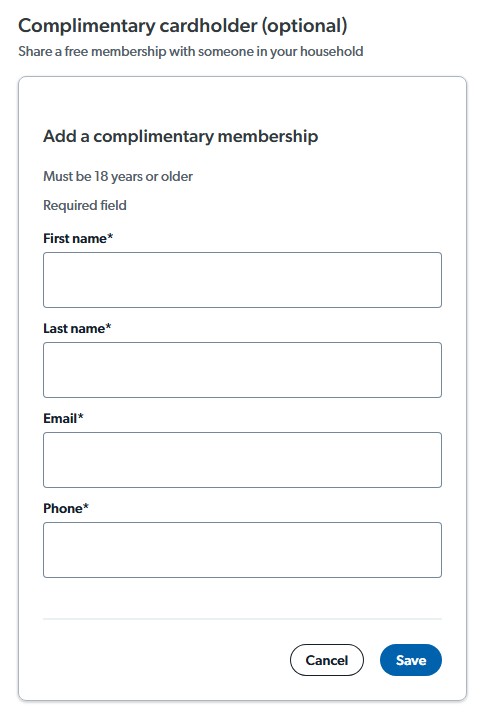
Enter your name, email, account password, phone number, and mailing address on the sign-up form. In the following section, you’ll have the option to add a complimentary membership
You only need to provide the secondary cardholder’s first and last name, email address, and phone number.
Add a Complimentary Membership on the Sam’s Club Website
You can register someone for the household membership at a later time through the Sam’s Club website.
Once logged into your account, click on “Account Information” under the profile menu at the top-right of the page.
Next, click on “Manage Memberships” under Membership on the left side of the page.
Add a Complimentary Membership on the Sam’s Club App
Adding a household member on the Sam’s Club app is just as easy as doing it on the website.
Once you’ve opened and signed into your Sam’s Club account on the app, tap on the Account icon at the bottom of the screen.
Next, scroll down until you see the Membership section and select “Manage Memberships”.
Getting a Sam’s Club Membership Card
Some Sam’s Club locations are transitioning to digital membership cards, and physical cards may no longer be available.
If your warehouse is still offering membership cards, the primary member or the secondary household member may go into the warehouse together or separately and visit the customer service desk with a photo ID to pick up their membership card.
Clubs that no longer offer membership cards will inform you to register for an account on the Sam’s Club app and use the digital membership card for checking out. Registering an online account requires a member number.
The primary member can find their membership number in the confirmation email or by logging into their account on the website or app.
Read more: Not a Sam’s Club Member? Get a Discount on a Sam’s Club Membership
How to Get the Complimentary Member Number
For the secondary household member to register for a Sam’s Club account for online shopping, or to use the Sam’s Club app for Scan and Go, or access their digital membership card, they will need their unique member number. This number is different from the primary member’s number.
Here are several ways to find out the secondary member number.
Using the Primary Member’s Number
The secondary member number is slightly different from the 17-digit primary member’s ID, with a couple of digits changed.
By changing the 6th and 7th digits of the primary ID from a “10” to a “21”, you can deduce the secondary member’s number.
    Primary Member: #####-10###-#####-##

Secondary Member: #####-21###-#####-##
Via Customer Support
You can contact Sam’s Club customer support via phone or live chat as the primary member to get the household member’s number.
The customer service phone number is 888-746-7726.
At a Sam’s Club Location
The household member can go into their local Sam’s Club and visit the Member Services desk with a government-issued ID. As long as the primary member has already added you to their account on the website or app, they do not need to accompany you into the warehouse.
You can either ask for a physical membership card if it’s still offered or get a printed slip with your unique member number.
Register Your Secondary Membership
You can now visit the Sam’s Club registration page to sign up online with the membership number.
To register on the Sam’s Club app, open the app and look for the “Sign in or create account” button. Then tap on the “Register Your Membership.”

You will be asked to provide your membership number and your first and last name. Your name must match what the primary member entered when they set up the complimentary account.
Closing $ense
The primary member might think Sam’s Club will provide you with the secondary member’s number. But upon logging into their account, they will only see their number, and the complimentary member’s number is nowhere to be found. It’s not listed on the Manage Memberships page or on the account anywhere.
Sam’s Club does not always email the complimentary account holder their account number. Or the email gets lost or caught by the spam filter. Should you not get the member number for the secondary member, these are the additional ways to get the complimentary member’s number.